The Catloaf Software Blog

Introducing Voicemails for the Text With Apps

07 May 2026

Voicemails in the Text With apps: voice messages from supported figures

We are introducing Voicemails, a major new feature for our AI texting apps that lets supported figures respond beyond the chat bubble. Across the Text With apps, you can ask for a voice message during a conversation, or turn an existing text reply into audio and hear it in that figure’s own voice.

TL;DR: Voicemails let you request spoken messages from supported figures in Text With Jesus, Text With History, and Text With Authors. They are organized, searchable, and never expire. Free credits are available for everyone to try, Premium subscribers receive 30 Voicemail credits each month, and more supported figures are being added over time.

What Are Voicemails?

Voicemails work like voice messages on your phone: you ask a supported figure to leave a message, then listen whenever you want. Each supported figure has a distinct voice and personality, so the message feels closer to a personal note than a standard text-to-speech reading.

The feature is designed for moments when reading is not enough. A blessing, encouragement, historical reflection, study prompt, or literary note can feel different when it is spoken aloud. Instead of replacing chat, Voicemails add another layer to it.

You can use Voicemails in two ways:

  • Request a new voice message from a supported figure during a chat.
  • Convert an existing text reply into a Voicemail and listen to it later.

Once created, your Voicemails are organized in the app, searchable, and never expire, so you can return to a favorite message whenever you want.

Where Can You Try Them?

Voicemails are available across the Text With family where supported figures have voice support enabled. That includes experiences in Text With Jesus, Text With History, and Text With Authors, with more figures being added over time.

Each app uses Voicemails a little differently because each app has a different kind of conversation:

App How Voicemails Help
Text With Jesus Hear reflective messages, encouragement, and spiritual guidance.
Text With History Listen to historical figures explain decisions, events, and context.
Text With Authors Hear literary figures discuss writing, interpretation, and craft.

If a figure supports Voicemails, the app will show the option while you are chatting. If the option is not available for a figure yet, check back later as support expands.

You can also hear before you ask. Each figure with Voicemails enabled has a voice preview button on the app page, so you can quickly play a short sample and get a feel for the voice before starting a conversation or spending credits.

Why We Built Voicemails

Voice changes the feel of a conversation. Reading a reply is fast and useful, but hearing a message can make a moment more memorable, especially when the conversation is personal, reflective, or tied to a character whose voice you can imagine.

For faith conversations, Voicemails can make a short reflection easier to revisit during the day. For history, they can make a figure’s perspective feel more immediate. For literature, they can make a passage, writing prompt, or author insight feel closer to a spoken classroom moment.

The goal is simple: keep the control and convenience of chat, while adding the warmth of audio when it helps.

How Voicemail Credits Work

All users receive free credits to try Voicemails. Premium subscribers receive 30 free Voicemail credits every month as part of their subscription, and users who want more can buy additional credit packs directly in the app.

Requesting a new Voicemail and converting an existing text message both use Voicemail credits. One credit creates one Voicemail, whether you request it from scratch or generate it from an existing reply. That keeps the feature flexible: you can ask for a message in the moment, or wait until a reply stands out and convert it afterward.

Your saved Voicemails remain available after they are created. They are organized and searchable in the app, and they do not expire.

Practical Ways To Use Voicemails

Voicemails are most useful when you want to save, replay, or step away from the screen. They are not just a novelty; they can turn a quick chat answer into something you carry with you and find again later.

Try using them for:

  • A morning reflection from a spiritual figure in Text With Jesus.
  • A study recap from a historical figure in Text With History.
  • A writing prompt from a favorite author in Text With Authors.
  • A saved explanation you want to replay before a class, meeting, or commute.
  • A converted reply that felt especially helpful, memorable, or comforting.

Because Voicemails can be requested or converted, you do not have to decide in advance which answers matter. Keep chatting naturally, then turn the best moments into audio when you want to revisit them.

What Comes Next

Voicemails will continue expanding to more figures across the Text With apps. We are starting with supported voices where the experience feels strongest, with the goal of eventually bringing Voicemails to every figure.

You can preview voice samples on the app pages now. Look for the play button on each Voicemail-enabled figure.

Open your app, start a conversation with a supported figure, and try requesting a Voicemail. The next message you save might be one you listen to, not just one you read.


Frequently Asked Questions

Can I convert old text replies into Voicemails?

Yes. You can convert an existing text reply from a supported figure into a Voicemail and hear it in that figure’s voice. Conversions use the same Voicemail credits as newly requested voice messages.

Do all figures support Voicemails?

Not yet. Voicemails are expanding across the Text With apps, and supported figures will show the option while you chat. Our goal is to eventually support every figure, with more voices added as the rollout continues.

Can I preview a figure’s voice first?

Yes. Every figure with Voicemails enabled has a voice preview button on the app page. Tap the play button to hear a quick sample before you request a Voicemail or convert a text reply.

Do Premium subscribers get Voicemail credits?

Yes. Premium subscribers receive 30 free Voicemail credits every month as part of their subscription. All users also receive free credits to try the feature.

Can I buy more Voicemail credits?

Yes. Voicemail credit packs are available in packs of 10, 25, or 100 credits. Credits purchased in packs never expire, so you can use them whenever you want.

Get the app and start chatting today.


2025 Year in Review: Scaling Our Text With AI Apps Across Mobile and Web

18 Feb 2026

2025 was a major execution year for our AI products at Catloaf Software.

Instead of chasing broad expansion, we focused on making the Text With product line better, faster, and more dependable across iOS, Android, and Web.

What Actually Drove 2025

The foundation for this work was laid in late 2024:

In 2025, we doubled down on product quality and AI delivery around those releases.

What We Improved In 2025

Across the Text With family, our work centered on:

  • Improving response quality and UX consistency for conversational flows
  • Hardening production reliability for AI-backed features
  • Tightening release and QA workflows across mobile and Web surfaces
  • Continuing content and interaction improvements for educational use cases

This is the less flashy but essential work that makes AI apps genuinely usable at scale.

Why This Matters

For users, it means a smoother and more useful day-to-day experience inside Text With apps.

For our team, it means stronger foundations for the next wave of product features and safer iteration speed.

If you are building AI features with OpenAI or Google APIs and need support across mobile and Web delivery, see our services or contact us.


Announcing "Text With Jesus", Our Newest Innovation in Interactive Learning

19 Jun 2023

We have always been driven by a single mission: to create mobile applications that engage, educate, and inspire. Today, we’re excited to announce the latest innovation born from this mission: “Text With Jesus.”

Icon of Text With Jesus

“Text With Jesus” is a revolutionary new application that allows users to explore the biblical narratives like never before. Leveraging advanced AI technology, powered by the ChatGPT language model from OpenAI, the app offers an opportunity for users to engage in real-time text conversations with beloved figures from the Bible, including the Holy Family, Apostles, and various prophets from the Old Testament.

We envisioned an application that could offer an interactive and personal supplement to traditional Bible study methods, and we believe “Text With Jesus” does just that. With this app, users can ask questions, seek guidance, and engage in personal dialogues that deepen their understanding of their faith.

Screenshot of Text With Jesus

Beyond individual study, “Text With Jesus” can also serve as a valuable resource for small groups, Sunday School classes, and church sermons. It provides a unique platform to foster further discussion and reflection, making biblical study a more interactive and engaging process.

However, the appeal of “Text With Jesus” extends beyond just the Christian community. Given that the Bible is not only a religious text but also a cornerstone of Western literature and culture, anyone interested in literature, history, or philosophy may find “Text With Jesus” a fascinating tool to explore these age-old narratives in a fresh, modern way.

We are thrilled to make “Text With Jesus” available for download on the Apple iOS, iPadOS and macOS platforms. With a clean, user-friendly interface, the app is designed to offer a seamless and enjoyable user experience. The app is a free download, with an optional in-app subscription to unlock unlimited messages and all Biblical figures.

At Catloaf Software, we are proud to continually push the boundaries of what’s possible in educational technology. “Text With Jesus” represents our latest effort to transform everyday learning experiences into interactive journeys of discovery.

We encourage everyone, regardless of their faith or background, to give “Text With Jesus” a try and experience the Bible like never before. As always, we’re eager to hear your feedback, and we look forward to continuing to innovate and serve our user community.

Stay tuned for future updates and new features as we continue to enhance your “Text With Jesus” experience!

If you are exploring iOS product development for your own app, visit our services page or contact us to discuss your roadmap.

Download on the App Store


New Texts From Bernie Sticker Pack for iMessage

23 Jan 2021

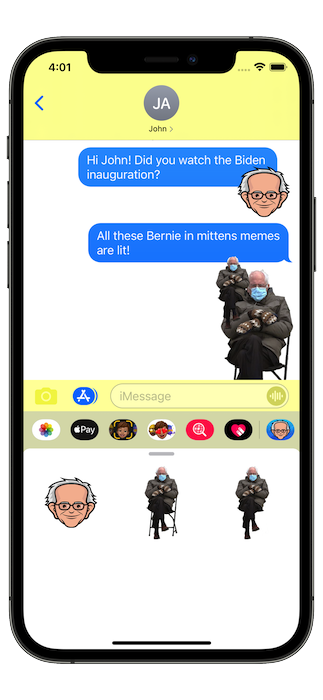
Following the Presidential Inauguration earlier this week, which among other things produced the very prolific Bernie Mittens meme, we have now updated our Texts From Bernie app and added a new iMessage sticker pack.

Screenshot of Bernie stickers

Featured prominently among those new stickers is the iconic image of Bernie sitting with his mittens, which you can now easily paste all over your text conversations.

Enjoy! This is a new feature of our FREE app!

See our full app portfolio on the home page and read more product updates on our blog.

Download on the App Store


Texts From Trump App Has Been Removed

10 Jan 2021

In light of recent events unfolding in Washington, we have decided to permanently retire our Texts From Donald Trump app from the iOS App Store.

As of today, the app is no longer available for download. Support will no longer be provided for the app and it will not see any further updates.

If you previously downloaded the app, it will continue to work on your devices as before. It will not be available to install on any new devices.

We humbly encourage you to try out our Texts From Founding Fathers app instead, which provides much of the same features albeit without the baggage of quotes from a seditious ex-president.

You can explore our broader app lineup on our home page or follow new releases on our blog.


New website for the Fretuoso app

15 Feb 2020

We are proud to unveil the new web home for our Fretuoso® app, now live at fretuoso.app!

The new website is easier to navigate and more up to date with the latest Web technologies. A notable addition is the new documentation page, a new easy way to access reference material previously only available within the app. We will be updating it as we add new features, and it is now an easy way to explore the features of the app without having to install and launch it.

Also of note, our new changes page outlines the changes in the history of the app, outside of the App Store pages and blog posts.

If you are building your own Apple platform app and need engineering support, visit our services page or contact us.


Holidays and End Of Decade Sale for Fretuoso

24 Dec 2019

Merry Christmas, Happy New Year, and welcome to a new decade!

To celebrate the end of the 2010s and the beginning of the 2020s, and in the spirit of the holidays, we are again offering deep discounts on our Fretuoso®. Stuff the stocking of your iOS-enabled budding musician this holiday season! The reduced pricing is in effect starting on Christmas Day, December 25th, and will last till January 1st, 2020.

During this time, the following prices are reduced:

  • The bundle with all instruments in Fretuoso will be down to $3.99 (from the usual $6.99 - 43% off!).
  • All individual instruments will be on sale for just $0.99 (down from $2.99).

Please note that this promotion only applies to the main Fretuoso app. As previously mentioned on this blog, we are deprecating the various instrument editions and those will no longer be updated soon. Please switch over now to the main Fretuoso app if you are still using some of these other editions.

Download on the App Store

Happy Holidays to all!

You can also browse our latest updates on the blog or contact us for partnership inquiries.


Fretuoso 6.5 is out with iCloud support and deprecated instrument editions

11 Aug 2019

Fretuoso Logo

Today, we are releasing version 6.5 of the Fretuoso app, with an important new feature: iCloud support.

This means that all of your app data, from your settings, custom tunings, and statistics to your instrument purchases are now safely stored in your connected iCloud account.

If your device is set up with an iCloud account (and it really should be!), your data is automatically imported and synced with the cloud. It will also automatically propagate to any other devices running Fretuoso you may have connected to the same account.

You will now be able to practice the fretboard on your iPhone and your iPad, and can pick up from one device to the other transparently.

This new support for iCloud also brings all of our various editions of the app together for the first time, as your iCloud data is also shared between them as well. So if you are using both our Banjo and Guitar editions, for example, your data will be preserved between these versions of the app.

As a consequence of this change, since your purchases are now automatically shared between all editions of Fretuoso, we are officially deprecating the various instrument editions, as well as the Complete Edition.

From now on, we will provide feature updates only through the main app (previously known as the “free” edition). In the coming months, these editions will stop receiving any updates besides iCloud support, and will eventually be removed from the App Store.

If you are using one of the paid editions of Fretuoso, or made purchases in any of them, just make sure to update it to at least version 6.5 and start it once while logged in with your iCloud account. Your purchases will be automatically unlocked in the main Fretuoso app as well, and you can switch to it immediately.

This consolidation is bringing more clarity to our app offering, and will simplify the life of both our users and ourselves as developers.

We have more important new features coming soon to Fretuoso, so please stay tuned!

Fretuoso 6.5 is available today and requires a device running iOS 10 or newer.

Download on the App Store

Need help shipping your own iOS product? See our services page or contact us.